Join our newsletter
A packed schedule can look great on paper. But if your most valuable appointment times are filled with procedures that could have been scheduled elsewhere, being busy doesn’t necessarily translate to higher dental practice production.
Most dental practices already know how they want their ideal day to run. Whether your team has a locked-in scheduling philosophy or is actively tuning your daily workflow to boost production, structuring an optimized calendar typically centers on a few proven principles:
- Protecting daily production targets: Reserving time for high-yield procedures during peak clinical hours.
- Grouping procedures strategically: Clustering similar treatments to optimize chair time and reduce setup turnover.
- Allocating operatories efficiently: Mapping complex procedures directly to the rooms and staff equipped for them.
- Scheduling around provider capacity: Placing more complex treatment when providers are at their best and using other parts of the day for simpler, less demanding appointments.
- Balancing provider schedules: Distributing appointments in a way that keeps doctors and hygienists productive without creating bottlenecks or downtime.
- Making room for the unexpected: Leaving enough flexibility for emergencies, same-day treatment, cancellations, and other changes that can reshape the day.
- Matching appointment length to treatment: Giving each procedure the right amount of time so the day stays on track without unnecessarily blocking valuable chair time.
- Overlapping appointments with intention: Staggering or overlapping eligible appointments by set intervals so providers can move between rooms and make better use of their available clinical time.
The challenge isn’t knowing how your practice should run. It’s getting everyone, including patients booking online, to follow that plan.
How Archy’s Schedule Guides support your practice
Archy’s Schedule Guides build those preferences directly into your dental schedule
You can define:
- Which appointment types should be booked
- When and where they belong on the calendar
- Which provider is assigned
- Your exact online booking preferences.
Protect time for the appointments that matter most
There are only so many hours in a clinical day, and not every appointment uses those hours the same way.
For example, you might set aside a longer block for complex treatment so it doesn't get broken up by shorter appointments throughout the day. Or, if a certain procedure requires specific equipment or an operatory, you can reserve the right combination of time, room, and provider for it.
Block scheduling with Schedule Guides helps you:
- Protect valuable time on your calendar.
- Maintain the appointment mix you want.
- Keep high-production treatment from getting crowded out by appointments that have more scheduling flexibility.
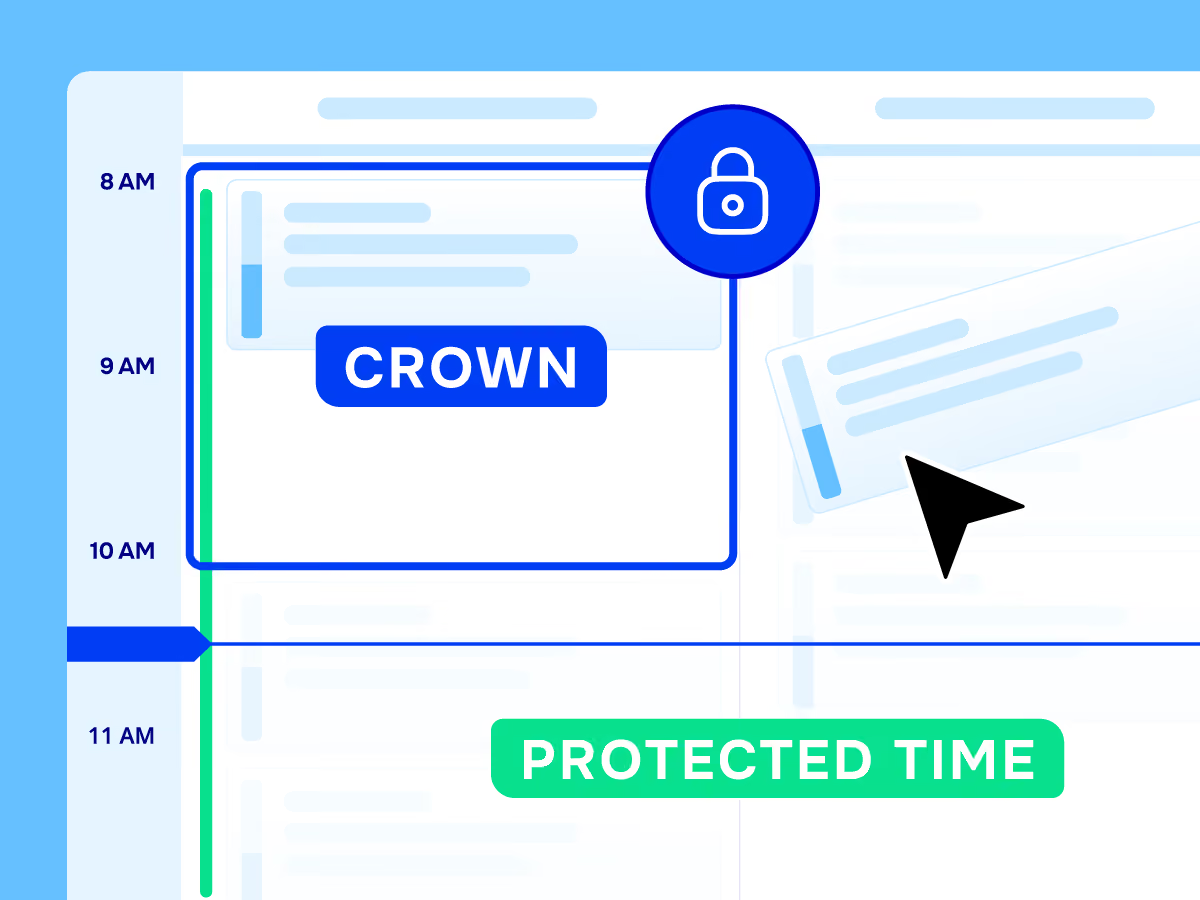
And you can get specific. If Room 1 is typically used by Dr. Smith for crowns every other Monday from 1–5 PM, you can build that directly into the schedule.
Make it easier to fill the right openings
Cancellations happen. When they do, knowing what should fill that opening can help your team preserve the structure of the day.
Schedule Guides can be displayed directly on the schedule, giving staff a visual reference for what different times are intended for.
- Targeted cancellation filling: Instead of looking for any patient who can come in at 10 AM, your team can see what type of appointment that time was reserved for and focus on filling it accordingly, helping protect the production potential of that opening.
- Aligning multiple staff on scheduling: Having a visual reference is especially useful when multiple people manage dental appointment scheduling. Your strategy doesn't have to rely on everyone remembering which procedures belong where. One of the goals of Schedule Guides is to make those preferences visible so employees can more quickly, accurately, and confidently place appointments into the right slots.
- Toggling schedule views: When your team doesn't need to see them, the guides can simply be hidden from the schedule view.
Offer online booking without giving up control
Online dental scheduling should make things easier for your patients and your front desk, not throw off the schedule you've worked to build.
With Schedule Guides, you maintain full authority over your online booking:
- Specify which appointment types are available for online booking
- Restrict online booking to specific times, providers, or operatories
- Set custom lead-time requirements and booking restrictions, including whether patients can book directly to your schedule or must first request an appointment for staff approval.
Patients still get the convenience of booking online 24/7, while your practice has more control over where those appointments land.
Make better use of provider time with multi-booking
Dentists don't always need to be with one patient for the entire appointment.
While an assistant or hygienist continues care in one room, the doctor may be available to see a patient in another. Schedule Guides can account for that with multi-booking.
Eligible appointments can be staggered or overlapped across multiple rooms, allowing your dental schedule to better reflect how your team actually works.
That creates more usable provider availability and more opportunities to see patients within the same clinical hours, helping your practice increase production without simply extending the workday.
Build the schedule around your dental practice
Every dental practice is different, and every provider doesn't need to follow the same schedule.
Schedule Guides give you the flexibility to account for those differences:
- Accommodating flexible provider rules: One provider might reserve extractions for the third Friday of every month.
- Matching morning vs. afternoon preferences: Another provider may prefer scheduling high-production procedures first thing in the morning.
- Meeting specific operatory requirements: A specialized procedure can be anchored to a particular room simply because that's where the equipment lives.
To support these workflows, you can customize every setting directly in Archy:
- Set when a guide occurs and how often it repeats
- Assign which appointment categories belong in each slot
- Specify which providers and rooms are available
- Control whether appointments can be booked online, and whether multi-booking is allowed.
Instead of changing the way your practice works to fit your dental scheduling software, your schedule can reflect the way your team already works.
Fill your dental schedule with production in mind
A full calendar is only part of the goal. Where appointments land matters, too.
By protecting time for high-production treatment, filling cancellations more intentionally, and making better use of provider availability, Schedule Guides can help your practice get more production out of the hours already on the calendar.
Book a demo and learn how to create your own Schedule Guides with Archy to see how smarter scheduling can help your practice make better use of every day.