Join our newsletter
Most of your insured patients finish the year with money left on their dental plan. A year-end benefits letter (sometimes called a use-it-or-lose-it reminder) prompts them to book before coverage resets, helping you fill open December chair time and hit your annual production goals.
Who should get a year end dental benefits letter?
Send the letter to active patients with remaining benefits above a set threshold. A patient with $20 left isn't going to book an appointment over it, and a letter about their "remaining benefits" can leave them confused about what you're asking them to do.
Base that minimum on your fee schedule. Find your fee for the lowest-cost visit you want to fill, then set the minimum just above it. If your adult prophy is $80, a $100 minimum means everyone on the list has enough left for a cleaning. A lower minimum, like $50, reaches more patients, but more of them will owe something out of pocket for the visit.
What should a year end benefits reminder include?
Keep the letter focused on one goal: giving patients a clear reason to schedule and an immediate way to do it.
Every letter should include:
- Their remaining benefits. If you can't merge in each patient's exact balance, use your minimum: "you have at least $100 in benefits remaining" is true for everyone on a $100-minimum list.
- A reminder that most dental benefits expire on December 31.
- A note about FSAs, since many flexible spending accounts share that year-end deadline.
- An online booking link alongside your office phone number, giving patients a way to reserve a chair immediately.
- A disclaimer that benefit estimates reflect only the claims your office has filed.
- Your holiday closure dates.
Don't skip the claims note. If a patient saw a specialist and you haven't verified their dental insurance since, they may have less left than your records show. Run an insurance check before sending whenever possible, and rely on the disclaimer to cover any unfiled claims.
Example end of year dental benefits letter
Use this as a starting point and adjust the wording to sound like your practice.
Subject: Use your dental benefits before they expire
Hi {Patient first name},
Our records show you have at least {Your balance minimum, e.g. $100} in remaining dental insurance benefits. Most plans expire on December 31, making this the best time to schedule an overdue cleaning, exam, or pending treatment.
Book online: {Booking link}
Or call us: {Practice phone}
If you have a flexible spending account (FSA) through work, check that balance as well. Those funds often reset on the same timeline.
This estimate reflects the claims on file in our office. If you've received care elsewhere this year, call us to confirm your remaining balance.
We look forward to seeing you.
Thanks,
{Practice name}
Please note that our office is closed {Holiday closure dates}.
When should you send an end-of-year benefits letter?
Start as early as September for larger treatment cases, or send between early November and early December for routine hygiene recall. Earlier outreach gives patients more open slots to choose from before your schedule fills.
Holiday travel and busy family schedules make it easy for patients to put off appointments. Giving them an online scheduling link in the body of the email helps secure those chair times before schedules fill up.
For patients who haven’t booked by the first week of December, follow up with a quick text. If your patient texting tool can send in bulk, leave out anyone with an upcoming appointment so they don’t get a reminder they don’t need:
Hi {Patient first name}, this is {Practice name}. Just a quick reminder that your unused dental benefits reset on December 31. Grab a spot before the schedule fills: {Booking link}
Send benefits reminders straight from Archy
Archy's email campaigns pull directly from your practice management software, keeping your patient eligibility and benefit balances up to date.
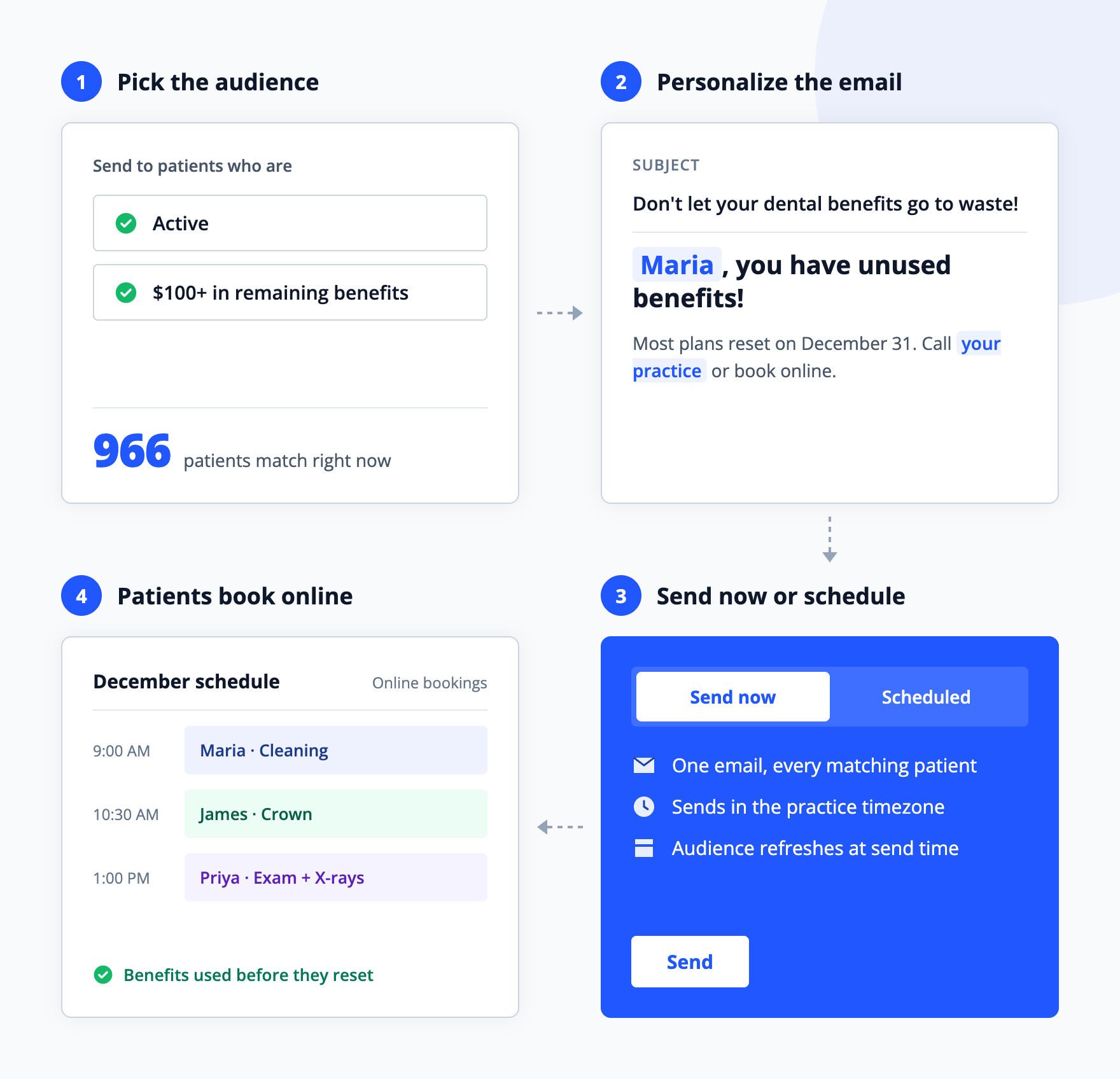
Already on Archy? Create a new email campaign, filter by Active and Remaining Benefit Amount, and add the online booking smart variable so patients can book straight into your schedule.
Ready to automate your year-end recall directly from your practice records? Book a demo with Archy.